
This article explains how to locate the MIB number (serial number) of your Medinbox system.
The MIB number uniquely identifies your Medinbox device and may be requested when:
- contacting Medinbox Support
- checking warranty information
- reporting an incident
- requesting maintenance or replacement parts
Option 1 – Find the MIB Number in AppCenter
- Log in to the Medinbox-user session.
- Wait for the AppCenter menu to load up.
- Select the Infos tab.
Your MIB number will be displayed in the system information section.

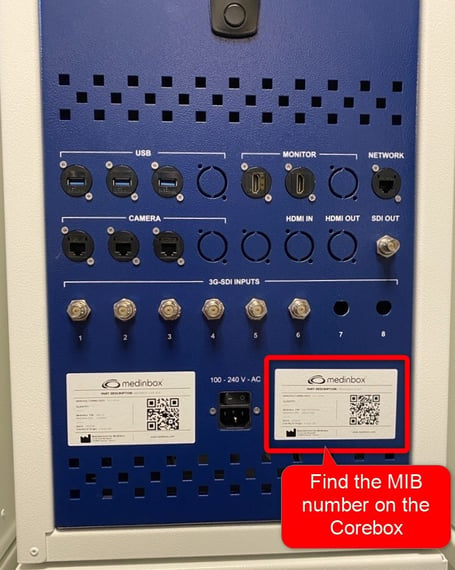
Option 2 – Find the MIB Number on the Corebox
The MIB number is also printed on the product label located on the front of the Corebox.
Location
- Front panel of the Corebox
- Bottom-right corner
- Product identification sticker
Look for a serial number in the following format:
MIBXXXXXXX(Example: MIB2601001)
When Contacting Support
To help us assist you faster, please provide:
- the MIB number
- a brief description of the issue
- any error message or screenshot, if available
This information allows Medinbox Support to quickly identify your system and its configuration.